

TL;DR:
- A compliant appraisal report submission depends on clear assignment definition, accurate UAD data, and successful UCDP processing.
- Failing to meet any of these criteria can cause rejection, rework, or compliance violations, delaying loan delivery.
A compliant, efficient workflow for appraisal report submission centers on three non-negotiables: a clear assignment definition under USPAP Standards Rule 2-2, UAD-compliant data, and a successful UCDP submission with a confirmed SSR before loan delivery. Miss any one of those, and you're looking at rejections, rework, or worse, a compliance violation.
Here's the one-line checklist you can apply right now:
- Confirm assignment scope (intended use and intended user)
- Complete all UAD fields and attach required exhibits
- Validate file format and assemble your XML/PDF package correctly
- Submit to UCDP, AMC portal, or lender portal as required
- Retrieve your SSR and Doc File ID, then reconcile any fatal findings
"The appraisal report must clearly state whether it is an Appraisal Report or a Restricted Appraisal Report, identify the client and intended users, state the intended use, and include a sufficient summary of the scope of work." — USPAP Standards Rule 2-2
Newjerseyrealestateappraisal (NJREAG) publishes this guide as a practical reference for state-certified appraisers and AMC operations professionals working in New Jersey and beyond.
Table of Contents
- How do the seven appraisal stages map to submission milestones?
- What does a step-by-step submission workflow actually look like?
- Which submission channels require what, and what does each enforce?
- What submission mistakes cause the most rejections?
- How long does submission take, and what drives the cost?
- What should you do after you submit?
- How does NJREAG run QA to produce defensible submissions?
- Key Takeaways
- Why this workflow matters more than most appraisers realize
- Newjerseyrealestateappraisal: state-certified, submission-ready reports across New Jersey
- Useful sources for appraisal submission compliance
How do the seven appraisal stages map to submission milestones?
Understanding where submission tasks fall inside the appraisal lifecycle prevents last-minute scrambles. The seven recognized stages of the appraisal process each carry a concrete deliverable tied to submission readiness.
- Assignment definition — Confirm intended use, intended user, property rights appraised, and effective date. This is the keystone. An incomplete assignment definition is the single most common cause of downstream rejection and USPAP violations.
- Preliminary survey and planning — Identify data sources, comparable sales pools, and inspection requirements. Deliverable: scope of work memo.
- Data collection and analysis — Gather subject property data, neighborhood data, and comparable sales. Deliverable: verified data workfile.
- Application of valuation approaches — Apply Sales Comparison, Cost, and/or Income approaches as warranted. Deliverable: completed approach grids.
- Reconciliation — Weigh the approaches and support the final value opinion. Deliverable: reconciliation narrative.
- Final estimate of value — State the concluded value with effective date. Deliverable: signed value conclusion.
- Report preparation and submission — Assemble the report, run QA, package files, and submit to the correct portal. Deliverable: submitted report with confirmed SSR or delivery receipt.
Assignment definition deserves extra attention. Establishing intended use and intended user at the outset prevents rework at every subsequent stage. A report prepared for a lender client cannot be repurposed for estate litigation without a new assignment and a new report.
| Stage | Deliverable | Owner | Submission Milestone |
|---|---|---|---|
| Assignment definition | Engagement letter with scope | Appraiser | Pre-work; gates all later steps |
| Preliminary survey | Scope of work memo | Appraiser | Confirms data plan |
| Data collection | Verified workfile | Appraiser | Required before report draft |
| Valuation approaches | Completed grids | Appraiser | Feeds UAD fields |
| Reconciliation | Reconciliation narrative | Appraiser | Required for report sign-off |
| Final value estimate | Signed value conclusion | Appraiser | Triggers report assembly |
| Report prep and submission | Submitted file + SSR/Doc File ID | Appraiser / AMC / Lender | Loan delivery eligibility |
For a deeper look at how these stages apply to New Jersey properties specifically, see key steps in the appraisal process for NJ homes.
What does a step-by-step submission workflow actually look like?
Step 1: Confirm assignment scope and report type
Before you write a single line of the report, lock down the assignment. USPAP Standards Rule 2-2 requires you to state whether the report is an Appraisal Report or a Restricted Appraisal Report, identify the client and all intended users, state the intended use, and include the effective date and report date. Choosing the wrong report type at this stage means the entire file is non-compliant, regardless of how well the analysis is done.
Note that USPAP does not mandate a specific report form.pdf?sfvrsn=5f6c1cde_7). The URAR (Fannie Mae Form 1004) is common for single-family lending assignments, but compliance depends on the substance of the report, not on the template. What matters is that the justification of value and scope of work are fully documented.
Step 2: Complete UAD fields and verify data consistency
UAD (Uniform Appraisal Dataset) fields must be filled out using standardized codes and formats. Check every field for internal consistency: condition ratings, quality ratings, and comparable adjustments must align across the grid. Inconsistencies here generate UAD compliance findings in the SSR and can escalate to fatal findings that block loan delivery.
Photographs, exhibits, location maps, and flood zone maps are required attachments. Verify that every exhibit referenced in the report body is actually included in the file package.
Step 3: Assemble the file package correctly
UCDP supports two file standards: UAD 2.6 (XML with embedded PDF, up to 15 MB) and UAD 3.6 (ZIP package containing UAD 3.6 XML, PDF, and a separate image folder, up to 60 MB). UCDP does not accept mixed standards under the same Doc File ID, so confirm which standard applies before you build the package.
Recommended file naming convention: use a consistent structure such as [FirmID]_[LoanNumber]_[EffectiveDate]_[ReportType]. Leave a placeholder for the Doc File ID until after initial submission, then update your internal records once UCDP assigns it.
Step 4: Run your pre-submission QA checklist
Work through these checkpoints before any portal upload:
Scope and compliance: Intended use and intended user documented in the report header and engagement letter. Report type (Appraisal Report vs. Restricted Appraisal Report) clearly stated per Standards Rule 2-2.
Data and UAD fields: All UAD fields completed with valid codes. Comparable data verified against MLS or public records. No blank required fields.
Certifications and signatures: Appraiser certification signed and dated. Supervisory appraiser signature included where required. License numbers and expiration dates current.
Attachments: All exhibits present (photos, maps, addenda). File size within portal limits. No password protection on PDF files.
File format: XML and PDF match in content. ZIP package structure correct for UAD 3.6 if applicable.
Pro Tip: Run your XML file through your appraisal software's built-in UAD validator before uploading to UCDP. Most platforms flag UAD compliance errors locally, which is faster and less disruptive than discovering them in the SSR after submission.
"Treat the SSR as an analytical QC tool, not a simple receipt. Proactively resolving UAD inconsistencies before final upload reduces re-submission cycles and protects loan delivery timelines." — Fannie Mae SSR/CU guidance
For a detailed breakdown of how to document intended user and report type to meet USPAP requirements, see achieving USPAP-compliant appraisal reports in New Jersey.
Which submission channels require what, and what does each enforce?
The channel you use determines the file format, metadata, and validation rules you must satisfy. Here's how the main paths compare:
| Channel | Required Files | Typical Validations / Enforcements |
|---|---|---|
| AMC portal | PDF report (sometimes XML); signed certification | Completeness check, signature verification, turnaround SLA tracking |
| Lender portal | PDF or XML+PDF per lender spec; Doc File ID from UCDP | Lender-specific field checks; Doc File ID required for loan package |
| UCDP (GSE) | UAD-compliant XML + embedded PDF (2.6) or ZIP (3.6) | UAD compliance findings, system findings, GSE proprietary findings; SSR issued |
| Secure FTP / email | PDF package; lender-specified naming | Manual review; no automated UAD validation |
UCDP is the single portal the GSEs (Fannie Mae and Freddie Mac) require for electronic submission of appraisal data files on conventional mortgages. A successful SSR from UCDP is required before loan delivery to either GSE. AMC portals and lender portals handle their own intake separately, but for any loan destined for GSE delivery, UCDP submission is mandatory regardless of what other portals you also use.
When XML is required (UCDP), the XML and the embedded or accompanying PDF must be consistent in content. Metadata discrepancies between the two files generate system findings. For assignments where only a PDF is required (certain non-GSE lenders, AMC portals), a clean, unprotected PDF with all exhibits embedded is typically sufficient.
Practical file structure for a UAD 3.6 ZIP package:
- Root folder:
[FirmID]_[LoanNumber]_[EffectiveDate]/ report.xml(UAD 3.6 XML file)report.pdf(full appraisal report PDF)images/subfolder containing all photo files in accepted formats- No password protection; no nested ZIP files inside the package
What submission mistakes cause the most rejections?
Most rejections are preventable. The errors below account for the majority of failed submissions and compliance flags.
- Unsigned or incorrectly dated certifications — An unsigned certification is an automatic rejection at virtually every portal. Check that the appraiser's license number, state, and expiration date are current and match state records.
For a broader look at common appraisal mistakes and how to fix them, avoiding common home appraisal mistakes covers the most frequent errors NJREAG sees in the field.
How long does submission take, and what drives the cost?
Timelines vary by assignment type, portal, and whether SSR findings require reconciliation. Here are realistic ranges for each stage:
- File preparation (QA and packaging): File preparation typically takes a few hours for a standard residential report, with additional time needed for complex or litigation-support assignments.
- Initial UCDP processing and SSR return: Initial UCDP processing and SSR return usually happens relatively quickly after upload during normal business hours.
- SSR reconciliation (if findings exist): SSR reconciliation for findings can take several business days depending on the nature of the issues and corrections needed.
- Re-submission and new SSR: Same-day to next-day processing once the corrected file is uploaded through the Appraisal View/Edit page in UCDP.
- AMC or lender portal review: AMC or lender portal review time varies according to the client's internal service level agreements.
Common fee drivers that push total cost higher:
- Property complexity (multi-family, mixed-use, unusual improvements)
- Extended travel or re-inspection requirements
- Rush requests that compress the normal QA cycle
- Rework triggered by SSR fatal findings or lender revision requests
- Special-purpose reports for estate litigation, tax appeals, or divorce proceedings
One important clarification: there is no standardized three-day GSE submission rule. Lenders set their own internal SLAs, and TRID requirements govern when appraisal copies must be provided to borrowers before loan consummation, not when the appraiser must submit to UCDP. Confirm your lender's specific SLA at assignment acceptance to avoid last-minute rush fees.
What should you do after you submit?
Post-submission is not passive. Here's the sequence to follow after every upload:
- Retrieve and log the Doc File ID. UCDP assigns one Doc File ID per loan. Record it immediately in your workfile and your internal tracking system. The lender needs it for loan delivery; losing track of it creates unnecessary delays.
- Review the SSR. Open the SSR and categorize findings: system findings, UAD compliance findings, and GSE proprietary findings. Fatal findings must be resolved before the SSR can reach "Successful" status.
- Reconcile fatal findings promptly. Correct the underlying issue in your appraisal software, rebuild the file package, and re-submit through the Appraisal View/Edit page in UCDP. The portal will run a new processing cycle against the same Doc File ID.
- Respond to revision requests. Any version of the appraisal that materially changes information used in underwriting must be re-submitted and achieve a new successful SSR. Delivering a revised report without re-submitting to UCDP invalidates loan delivery eligibility.
- Confirm receipt with the AMC or lender. Don't assume a successful SSR means the lender's portal also accepted the file. Verify status in every system where the report was submitted.
- Archive the complete file. Store the final report, all exhibits, the SSR, the Doc File ID, and all correspondence in a secure, named folder. USPAP requires appraisers to maintain a workfile for each assignment, and state licensing boards can request records during audits. A retention period of at least five years is standard practice, though some assignment types (estate, litigation) warrant longer retention.
How does NJREAG run QA to produce defensible submissions?
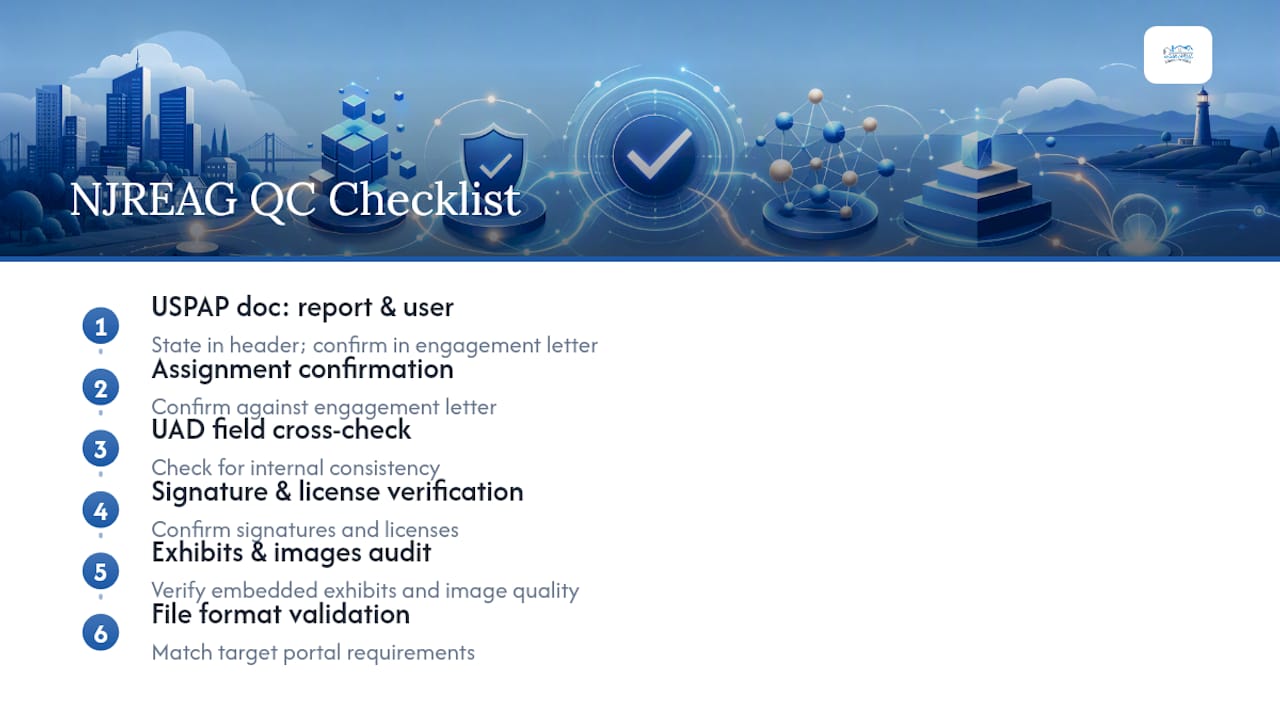
Newjerseyrealestateappraisal follows a firm-level QC process before finalizing any report and before any portal upload. Every file goes through a structured checklist: assignment confirmation against the engagement letter, UAD field cross-check for internal consistency, signature and license verification, embedded exhibit audit, image quality review, and file format validation against the target portal's requirements.
USPAP Standards Rule 2-2 governs how we document the chosen report type and intended user. Both are stated in the report header and confirmed in the engagement letter before the file is finalized. That documentation is what makes a report defensible in a lender review, a state board audit, or a courtroom.
"Even a technically sound appraisal can be rejected if the UCDP metadata or file packaging is incorrect. Technical packaging is as important as substantive compliance." — UCDP technical requirements overview
In one recent assignment, NJREAG received an SSR with UAD compliance findings related to inconsistent condition ratings between the subject property grid and the comparable adjustments. We identified the source of the discrepancy within the same business day, corrected the UAD field entries, rebuilt the ZIP package, and re-submitted through the Appraisal View/Edit page. The corrected file received a Successful SSR the following morning, keeping the loan delivery timeline intact. The entire resolution cycle ran under 24 hours because the workfile was organized and the original QA checklist had already isolated where the inconsistency could have originated.
For guidance on preparing court-ready and legally defensible appraisal files, see how to compile legal-ready appraisals in New Jersey.
Key Takeaways
A compliant appraisal report submission workflow requires clear assignment definition, UAD-accurate data, correct file packaging, and a confirmed Successful SSR before loan delivery.
| Point | Details |
|---|---|
| Assignment definition is the keystone | Define intended use and intended user at the start; errors here cascade through every later stage. |
| USPAP Standards Rule 2-2 governs report type | Every report must clearly state Appraisal Report or Restricted Appraisal Report and document intended user and use. |
| SSR is a QC tool, not a receipt | Review all findings categories; fatal findings must be resolved before the SSR reaches Successful status. |
| Doc File ID is mandatory | UCDP assigns one Doc File ID per loan; omitting it from the loan package causes immediate rejection at delivery. |
| Newjerseyrealestateappraisal delivers submission-ready reports | NJREAG's state-certified appraisers run a full QA checklist before every UCDP submission across all 21 NJ counties. |
Why this workflow matters more than most appraisers realize
Most submission failures aren't about the quality of the analysis. They're about process gaps: a missing intended user statement, an unsigned certification, a ZIP package built to the wrong UAD standard. We've seen technically excellent appraisals rejected at loan delivery because the Doc File ID wasn't recorded and included in the loan package. That's a fixable problem, but it costs time and credibility.
The compliance stakes are higher in legal and financial contexts. For divorce, estate, and tax appeal assignments, a report that can't survive a USPAP review or a lender's SSR reconciliation isn't just inconvenient. It can delay a court proceeding, hold up an estate settlement, or undermine a tax appeal hearing. Workflow discipline is what separates a defensible report from one that creates problems for everyone involved.
We've worked across all 21 New Jersey counties for over 26 years, and the pattern holds: appraisers who treat submission as a structured process rather than a final step have fewer rejections, faster closings, and stronger standing when a report is challenged. If you want help building that process or need a submission-ready report prepared by a state-certified firm, call us at (908) 517-3913.
Newjerseyrealestateappraisal: state-certified, submission-ready reports across New Jersey
When a report needs to hold up in court, close a loan, or support a tax appeal, the submission process matters as much as the analysis behind it. Newjerseyrealestateappraisal prepares USPAP-compliant, UCDP-ready appraisal reports for lenders, AMCs, attorneys, and estate professionals throughout New Jersey, including Atlantic County and Union County.

Every report we deliver includes full UAD field verification, correct file packaging for the target portal, and SSR reconciliation support when findings arise. We handle estate and date-of-death appraisals that need to meet court-ready standards, lending assignments that require a clean UCDP submission, and litigation support reports where defensibility is the priority.
Request a quote or ask about submission support directly: visit our services page or call (908) 517-3913.
This article provides general information about appraisal submission workflows and is not legal or financial advice. Confirm current USPAP requirements, GSE guidelines, and portal specifications with the relevant primary sources or a qualified professional.
Useful sources for appraisal submission compliance
Keep these primary sources bookmarked. When you're resolving SSR findings or verifying UAD requirements, go to the source rather than a secondary guide.
- USPAP Standards Rule 2-2 (reporting options and required elements) — The governing standard for report type selection, intended user documentation, and scope of work requirements.
- Fannie Mae: Uniform Collateral Data Portal overview — UCDP submission requirements, SSR guidance, and TRID-related operational notes.
- Freddie Mac: UCDP General User Guide — Step-by-step instructions for submitting, viewing, and resubmitting files; UAD 2.6 and 3.6 file specifications.
- Freddie Mac / Fannie Mae: UCDP Overview fact sheet — SSR structure, Doc File ID requirements, and fatal findings definitions.
- Fannie Mae: SSR and Collateral Underwriter feedback guidance — How to interpret and reconcile SSR findings categories before final delivery.
- Fannie Mae Selling Guide: UAD and UCDP re-submission rules — Requirements for re-submitting revised appraisals and maintaining loan delivery eligibility.
- USPAP Q&A — The Appraisal Foundation — Authoritative interpretations of USPAP applicability in specific assignment situations.